
With break-ins on the rise in South Jersey and the Philadelphia suburbs, spring is the perfect time to bolster your home security—without breaking the bank. A modern smart camera system can deter intruders, record evidence, and give you peace of mind, and you can set one up for under $500. Here’s how.
1. Select Affordable, Reliable Cameras
Choosing the right hardware is the foundation of any camera system. For under $500, look for:
- Dual- or 4-pack bundles from brands like Wyze, Reolink, or Eufy (≈$60–$80 per camera).
- Key features: 1080p or 2K resolution, night vision, motion detection, and two-way audio.
- Weatherproof rating (IP65 or higher) if you’re covering outdoor areas.
Tip: Read local reviews—search “security camera NJ” on Amazon to see which models hold up in humid, coastal climates.
Alt text: “Wyze V3 smart security cameras in packaging, ready for install.”
2. Plan Strategic Placement
Proper camera placement maximizes coverage and minimizes blind spots:
- Front & Back Entrances: Capture anyone approaching your doors.
- Ground-Floor Windows: Focus on accessible windows and sliding doors.
- High-Traffic Zones: Driveways, backyards, and side gates.
- Indoor Areas: Main hallway or living room, especially if you have linked door sensors.
Quick floor-plan exercise: Sketch your home layout, mark 3–4 mounting points, and note distance to your Wi-Fi router (aim for <100 ft per camera for reliable signal).

3. Simplify Power & Connectivity
You have two common options—wired vs. battery:
| Power & Connectivity | Pros | Cons |
|---|---|---|
| Wired (PoE/USB) | No battery swaps; stable network link | Requires power outlet or PoE injector |
| Battery-Powered | Flexible placement; no cables visible | Batteries last ≈3–6 months; manual swap |
- Router Placement: If going wireless, ensure your router has a clear line-of-sight or add a mesh node near your cameras.
- Power Adapters or PoE Injectors: Under $30 each, these let you run data and power on one cable for wired cameras.

4. Configure Recording & Storage
Recording options vary by brand—choose what fits your budget and privacy comfort level:
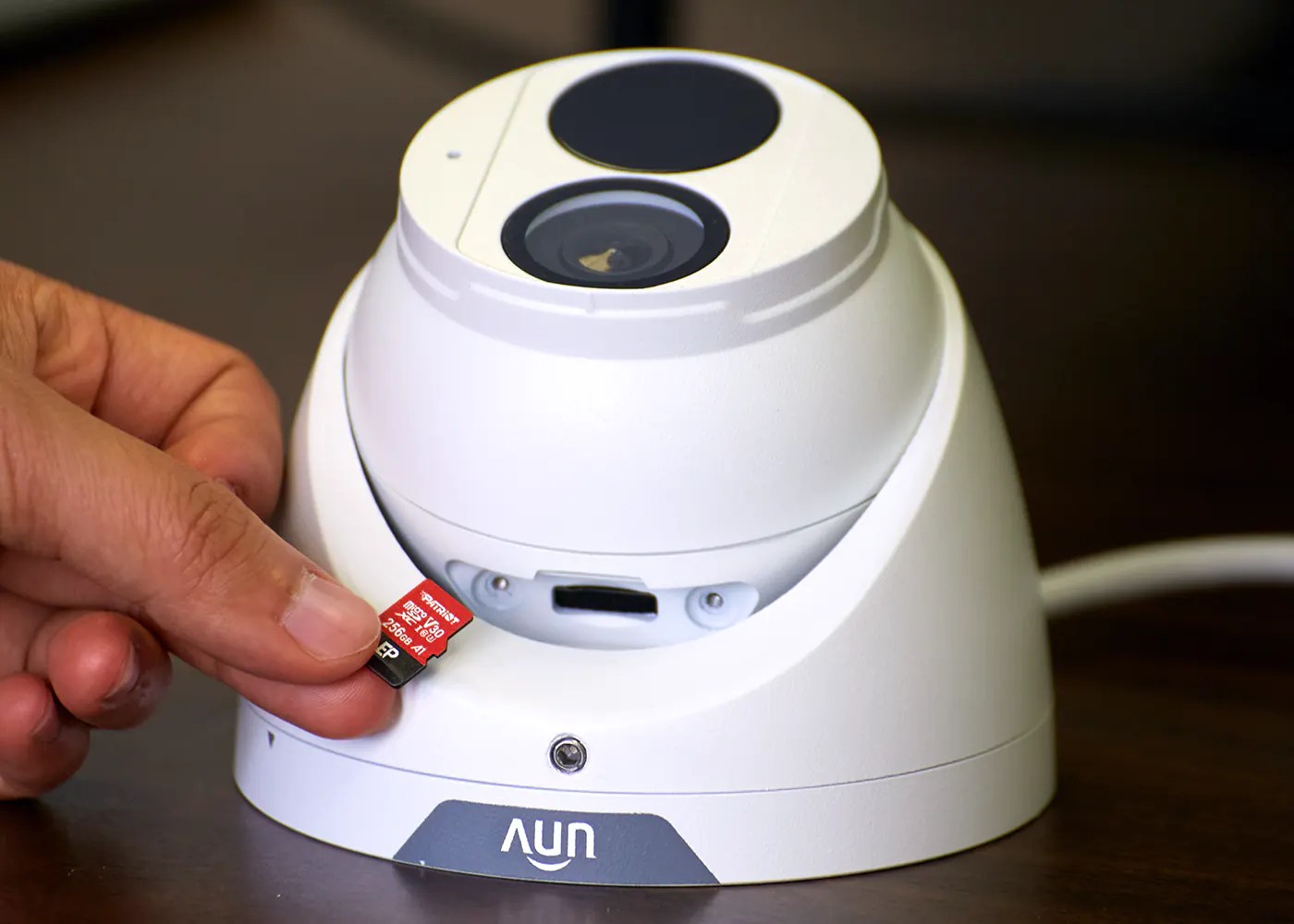
- Local SD Card: Most budget cameras accept 32–128 GB microSD cards (≈$15).
- Pros: No monthly fees; data stays on-site.
- Cons: Risk of card failure; limited storage (~3–7 days).
- Cloud Subscription: Plans start at $3–$5/month per camera.
- Pros: Off-site backup; easy review on mobile app.
- Cons: Recurring cost; potential privacy concerns.
Hybrid Approach: Use SD for basic recording, cloud for critical zones (entrances).
5. Secure Your System & Enable Mobile Alerts
Once cameras are installed and recording, take steps to lock down your network and stay informed:
- Change Default Passwords—use strong, unique passphrases.
- Enable Two-Factor Authentication on the camera vendor’s app.
- Create a Guest SSID for IoT devices, isolating cameras from your main Wi-Fi.
- Configure Motion Alerts—set sensitivity, activity zones, and notification schedules to avoid false alarms.
- Test Alerts—walk in front of each camera and confirm instant push notifications on your phone.

Ready to Go Beyond DIY?
If you’d like a professionally designed and installed system, Esatto Technologies offers end-to-end security camera installations in Southern & Central NJ, DE, and Philadelphia/KOP—all tailored to your budget. Our turnkey service includes:
- In-home consultation & placement survey
- Neat cable routing or discreet battery setups
- Firmware updates and network segmentation
- Customized alert configurations & training
Learn More About Our Security Systems →
or call 609-616-0263 to schedule your free site assessment!
About Esatto:
Esatto Technologies LLC keeps local homes and businesses safe with modern security solutions, proactive IT support, and custom installations—serving South Jersey to the Philadelphia suburbs. From DIY guidance to full professional setups, we secure what matters most.

Leave a Reply